Aquiva blog/Salesforce Releases
Bring Your Own Channel for CCaaS: how the pieces fit together
Salesforce documents each BYOC API well. Assembling them into one contact center is the integrator's work: who owns each direction, what a stable message ID buys you, and what a package can carry.

An agent working a WhatsApp conversation on an external contact center console has the customer's message on one screen and the customer's record on another. The agent copies the order number across by hand. When the conversation ends, the transcript stays in the CCaaS platform and the case stays in Salesforce. In the organizations we have worked with, this gets tolerated rather than solved, because the obvious fix has always been to migrate the channel, and nobody wants to migrate the channel.
Bring Your Own Channel for CCaaS is Salesforce's answer: a set of APIs that lets the external platform deliver its conversations into the native agent console. The channel stays where it is, and the agent stops switching windows. Each piece is well documented on its own: the Interaction Service API, the Pub/Sub API, and the Service Connector API for voice.
What follows is the version of that assembly we would have wanted before starting. Where something is documented Salesforce behavior we say so, and where it was our decision we say that instead.
What we implemented, and what was in scope
What we built is BYOC for CCaaS: the Contact Center as a Service variant, where an external contact center platform brings its own channels into the Salesforce console, rather than BYOC for Messaging. Every messaging channel the CCaaS platform handles arrives in Salesforce Omni-Channel as a single channel, so the agent works every conversation from the same console. We also built the Agentforce agent that takes the first line of contact across all of those channels.
Supervisors get Command Center for Service, where they monitor every queue, Agentforce agents included, from one app. The same build also connects to Salesforce Voice with Partner Telephony through its own APIs, and voice gets its own section below.
The flow runs in two directions, on two mechanisms
Documented Salesforce behavior.
Inbound and outbound use different mechanisms, and it helps to have both in view from the start. Inbound, the partner connector builds an Interaction Service payload and posts it to the interactions endpoint. Salesforce creates the messaging session and the messaging end user record, and Omni-Channel routes the work to an agent. Outbound, when the agent types a reply, Salesforce publishes it to the custom platform event configured for the channel. The partner's middleware subscribes to that event through the Pub/Sub API and either handles it itself or forwards the message to the external channel.
The custom platform event is the messaging path; voice does not use it by default. It carries outbound messages plus typing and read indicators, so the subscriber has to handle more than message bodies. The event is yours to name: nothing on the platform side depends on what you call it, so pick a name the subscriber can live with and then leave it alone.
This design avoids polling against Salesforce request APIs. It does not make the traffic free: Pub/Sub and platform event delivery have their own allocations, and those are the numbers to watch as volume grows. We are not publishing a throughput figure from our own build, because it would not transfer. What a BYOC channel carries depends on the CCaaS platform in front of it and on the limits of the org behind it.
Standard Omni-Channel reached end of life with the Summer '26 release, and Salesforce upgraded orgs to Enhanced Omni-Channel automatically during the rollout. Any BYOC plan written against Standard needs re-reading.
The Connect REST API is the read path we used. Its conversation entries resource returns the transcript of one conversation, whether the CCaaS platform, a Flow or a Lightning Web Component is asking. Salesforce designed it for single conversations and small batches, not bulk export, and it has its own hourly rate limit. Salesforce now also offers a newer Conversation Data API for the same read; both are described in Access Conversation Data.
Three identifiers do three different jobs
Our design decisions.
We learned why the distinction matters in our own build, when a retry from the provider put the same customer message on an agent's screen twice.
The external conversation ID correlates; it does not deduplicate. It ties the conversation on the provider's side to the session on the Salesforce side. A conversation legitimately contains many messages, so using it to detect duplicates would throw away real traffic.
A stable per-message ID detects resends. The external message ID, or the ID on the interactions payload, is what tells you that the message now arriving is one you already stored. Without it, every provider retry becomes a second copy on the agent's screen, and the agent has no way to tell which one is real.
A request UUID is for diagnosis. It follows one API call through the logs. It is not a business key and should not be used as one.
The other thing to decide alongside the identifiers is what happens after a 5xx: retry, escalate, or show the failure to the agent. Someone has to choose, and a team that does not choose has chosen the first option by default. We retry, and when the retries run out, the failure shows in the agent's console.
Settle the event contract before writing Apex. Changing it later means touching every subscriber at once, and platform events have no schema migration.
A MessagingSession is not the whole conversation
Documented Salesforce behavior.
The messaging object model has more layers than most teams expect. A Conversation can hold one or more messaging sessions or calls, so a MessagingSession is one session rather than the customer's whole history with you.
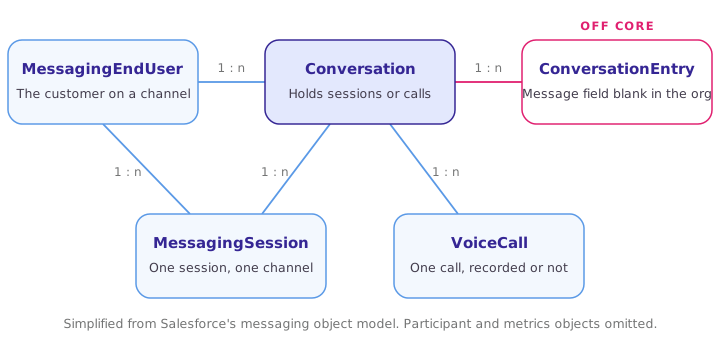
One MessagingEndUser can have several MessagingSession records and one or more Conversation records, and each Conversation holds one or more ConversationEntry records. For enhanced channels, which is what BYOC runs on, the entries are stored off core. A ConversationEntry record appears in the org once the session ends, but its Message field is blank; the text lives in a separate store and is read through the APIs described above. The full diagram, with participant and metrics objects, is in Salesforce's messaging object model documentation.
For reporting, that off-core conversation data can be synced to Data 360, where it can be reported on and exported in bulk, which the conversation entries resource is not built for.
Voice is its own project
Salesforce Voice with Partner Telephony, formerly Service Cloud Voice with Partner Telephony, follows a similar shape: the telephony platform drives the call lifecycle, Salesforce creates and updates the VoiceCall record, and the softphone sits inside Omni-Channel with the call controls wired through the Service Connector API.
The Service Connector API is a JavaScript library you extend to handle the voice events. It runs inside the Omni-Channel phone widget, listening for events and forwarding them where they need to go, and it comes with methods for the supported operations: transfer, hang up, add a supervisor, and the rest.
The setup differs from messaging BYOC in the ConversationVendorInfo metadata, which defines the vendor type, the telephony provider's URLs and the features it supports. Voice needs its own channel, and the data model shifts a little too: calls live in VoiceCall and, where recording is on, VoiceCallRecording, while the transcript reuses the same Conversation and ConversationEntry objects.
Assisted replies run on the native prompt template, behind a custom component
Service Cloud offers two ways to do assisted replies. The native one is the standard Assisted Replies component, which is tightly coupled to the Enhanced Conversation component. One of our clients did not want the standard conversation component and had built their own, so we took the other route: a custom Lightning Web Component that calls the same prompt template in the background. The native component runs on an editable prompt template, and ours calls that template directly, so the agent gets a very similar experience and the LLM side is exactly the same implementation.
Any license that gives access to prompt templates is enough for this route. The list below is current as of November 2026; the Agentforce names come from Salesforce's packaging update of June 17, 2025, which replaced the Einstein add-ons and Einstein 1 Editions:
- Agentforce 1 Editions (Sales, Service, Field Service and the rest), formerly Einstein 1 Editions. Prompt Builder, Data 360 and credits are included, and older contracts signed under the Einstein 1 name carry the same entitlement.
- Per-user Agentforce add-ons: Agentforce for Sales, Service or Platform, formerly Einstein for Sales, Service or Platform. This is the most common route on an org that already runs Enterprise or Unlimited.
- Agentforce with Flex Credits, licensed at org level, where every prompt template invocation draws credits.
- Einstein Copilot and Einstein GPT add-ons from the 2023 and 2024 contracts, which Salesforce has since migrated to the Agentforce names.
- Developer Edition with Agentforce and Data 360, the free developer edition, for building and testing only.
In our implementation, every suggested reply requires agent review before it can be sent. That was our decision, not a platform limitation, and it is the decision we would make again.
None of this needs a custom model, fine-tuning or an ML pipeline. The engineering is in the inputs: a transcript the template can read, a record relationship it can follow, and Knowledge content someone keeps current. The third one is the one that decays quietly. A suggestion grounded in an article that went stale a year ago is worse than no suggestion, because it reads as confident, and an agent who accepts a wrong one stops trusting the panel afterwards.
What our package carried, and what each org still needed
Our packaging experience.
A binary split between "packageable" and "manual" is too clean, and the line has moved as the platform has. Three buckets describe it better.
Most of the build ships in the package. Apex classes and triggers with their test coverage, the Lightning Web Components and the console app, custom objects and fields, the channel definition and vendor information records, the custom platform event that carries outbound traffic, and the custom prompt template behind the assisted replies component. For voice, the Conversation Channel Definition is not needed and the vendor information differs.
Some configuration happens after install, every time. Activation, user assignment, the concrete channels, and the queues and routing configuration. These depend on the org and no package carries them.
The rest depends on your distribution strategy. How OAuth is handled differs for a partner-distributed app and a customer-configured one, and prompt template packaging has moved with the platform. Both the GenAiPromptTemplate and the External Client App are packageable in 2GP, which is what settled it for us. A partner-distributed app has to use External Client Apps, with JWT or the web server OAuth flow.
Whatever falls in the second and third buckets, write it up as a setup guide and treat that guide as a deliverable.
Decisions worth settling before the first line of Apex
- Which channels go through BYOC and which stay where they are. Not every channel needs a Salesforce session.
- Which system guarantees a stable per-message ID. If the provider cannot promise one, you are building one.
- What a failed outbound message does, and who sees the failure.
- Whether routing is Salesforce-owned or partner-owned, because the events you must handle change with the answer. Ours was partner-owned.
- Where reporting will come from, before anyone promises a unified report.
- Who owns Knowledge. Assisted replies are worth what the articles behind them are worth, and that owner is rarely on the integration team.
This article accompanies our talk at Mexico Dreamin' in Mexico City on Friday, 20 November 2026.
Where Aquiva fits in
We build and ship integrations like this one on Salesforce, including the packaging and the security review path when the result is meant to be distributed rather than used once. If you are evaluating BYOC for a CCaaS platform, or extending Service Cloud with a channel Salesforce does not support natively, talk to us before you commit to the architecture.